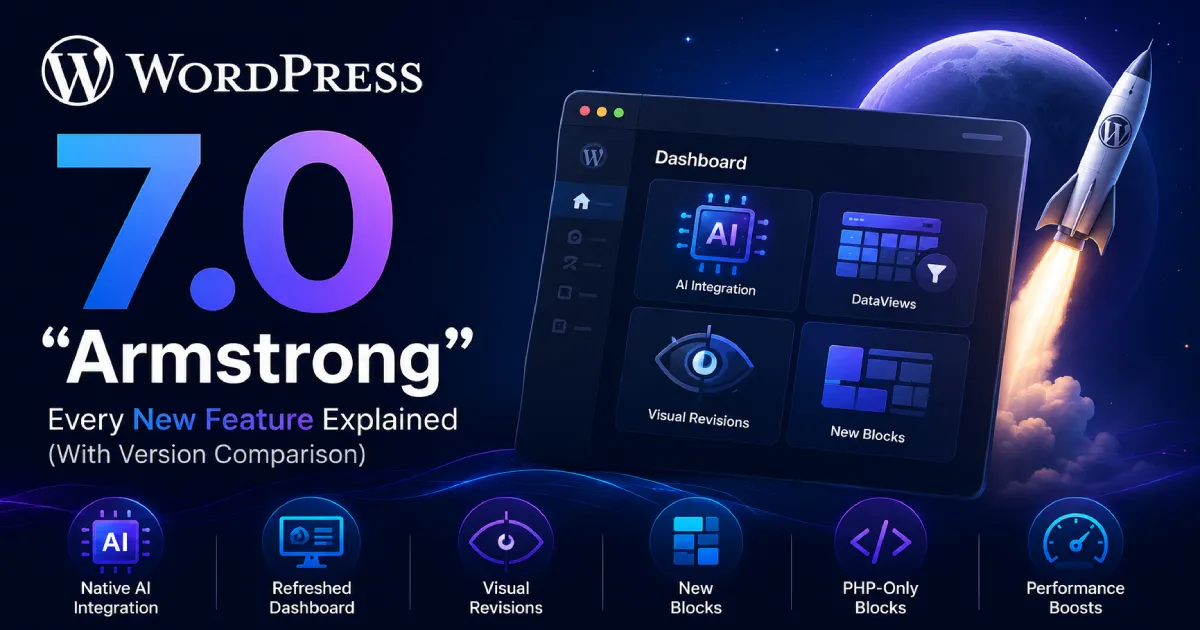

WordPress 7.0 “Armstrong” officially landed on May 20, 2026 — and it’s not just another point release. This is the version where WordPress steps into the AI era, overhauls its admin interface for the first time since 2013, and doubles down on becoming a full design platform. Whether you’re a site owner, developer, or WordPress agency, understanding what changed — and what didn’t — is critical before you update.
In this post, we break down every major feature in WordPress 7.0, compare it against versions 6.7, 6.8, and 6.9, and explain what it means for how you build and manage sites today.
🚀 WordPress 7.0 at a Glance
- Release Date: May 20, 2026
- Nickname: “Armstrong” (honouring jazz legend Louis Armstrong)
- Gutenberg versions included: 22.0 – 22.6
- Minimum PHP: 7.4 (PHP 8.2+ strongly recommended)
- What shipped: WP AI Client, Connectors API, DataViews admin, Visual Revisions, 3 new blocks, PHP-only blocks, performance hardening
- What did NOT ship: Real-time collaboration (cut on May 7, 2026 due to stability issues)
🤖 Feature 1: Native AI Integration — WP AI Client & Connectors API
This is the headline feature of WordPress 7.0. For the first time, AI is baked into WordPress core — not via a third-party plugin, but as a foundational infrastructure layer.
What’s included:
- WP AI Client: A provider-agnostic PHP library (
wp_ai_client_prompt()) and JavaScript REST API. Plugins and themes can now request text generation, image creation, speech conversion, and even video generation from any connected AI provider — without each plugin needing its own integration code. - Connectors API: A new Settings → Connectors screen in wp-admin where you enter API keys for AI providers. Supports OpenAI, Google Gemini, Anthropic, and custom endpoints. One set of credentials shared across all AI plugins — no more entering your API key in 5 different plugin settings.
- Abilities API (from 6.9): WordPress 7.0 builds on top of this foundation introduced in 6.9 — a capability registry that standardizes what AI integrations can do.
What this means for plugin developers:
If you build WordPress plugins, this is huge. Instead of writing your own OpenAI integration, you can now tap into the WP AI Client and let users connect their preferred AI provider through the Connectors screen. This reduces development time, eliminates credential duplication, and makes your plugin work with any AI backend.
At ByteCore Stack, we’re already exploring how MCP Manager can leverage this native AI infrastructure to offer deeper WordPress-AI connectivity without reinventing the wheel. You can also read more about how AI is reshaping WordPress development in our post on AI ROI pressure and tech priorities in 2026.
🖥️ Feature 2: Refreshed Admin Dashboard (DataViews)
WordPress’s admin interface hadn’t seen a meaningful overhaul since 2013. WordPress 7.0 changes that with DataViews — a new React-based system that powers list screens across the dashboard (Posts, Pages, Users, Media, etc.).
What changed:
- Smooth page transitions: Navigation between admin pages now uses the CSS View Transitions API, making the backend feel like a modern web app rather than a series of full page reloads.
- Command Palette shortcut: A visible shortcut button in the top menu bar gives instant access to the Command Palette from anywhere in the dashboard — not just the editor.
- DataViews tables: List views for content are now powered by a faster, more flexible React component with improved filtering, sorting, and bulk actions.
This is the kind of UX update that makes WordPress feel less like legacy software and more like a modern SaaS product.
👁️ Feature 3: Visual Revisions
Reviewing template or pattern changes used to be painful — you’d need to visually diff two versions yourself. WordPress 7.0 introduces Visual Revisions, a slider-based comparison tool with color-coded diffs:
- 🟢 Green = additions
- 🟡 Yellow = changes
- 🔴 Red = deletions
This is especially useful for agencies and teams reviewing pattern or template changes before publishing. No more guessing what changed between revisions.
🧩 Feature 4: Three New Native Blocks
WordPress 7.0 ships three new blocks directly in core:
- Breadcrumbs Block: Schema-ready, SEO-friendly breadcrumb navigation — no plugin required. A long-awaited native solution.
- Icons Block: Add scalable SVG icons to your content without relying on icon plugins or custom code.
- Navigation Overlay Close: A dedicated close button block for mobile navigation overlay panels, solving a common UX gap in block themes.
Additionally, the Headings block now consolidates H1 through H6 in a single component, and the Grid block received improvements for responsive editing.
Each of these replaces a plugin that millions of sites currently depend on — reducing plugin count, improving load times, and eliminating update overhead. This ties into a broader WordPress strategy of building capabilities natively that developers previously needed third-party solutions for. If you’re building on WordPress, check how our MCP Manager fits into the evolving plugin ecosystem.
🛠️ Feature 5: PHP-Only Blocks (No React Required)
This is a big one for PHP developers. WordPress 7.0 introduces the ability to create blocks using PHP only — no JavaScript or React build process required.
Previously, creating a block required setting up a Node.js/npm build environment with React. For many PHP-first developers, this was a significant barrier. Now, you can register a block entirely in PHP, making block development accessible to a much wider pool of WordPress developers — and dramatically reducing boilerplate for simple use cases.
⚡ Feature 6: Performance & Core Hardening
- More efficient database handling: Optimized query execution and caching improvements reduce server load.
- Smarter image loading priority: Improved detection prevents hidden images (in nav overlays or interactive blocks) from consuming LCP budget.
- On-demand block stylesheet loading: More reliable in classic themes, reducing render-blocking CSS.
- Script module dependencies: Classic scripts can now list script modules as dependencies, reducing render-blocking JavaScript.
📊 WordPress 6.7 vs 6.8 vs 6.9 vs 7.0 — Full Comparison Table
| Feature Area | WP 6.7 (Nov 2024) | WP 6.8 (Apr 2025) | WP 6.9 (Aug 2025) | WP 7.0 (May 2026) |
|---|---|---|---|---|
| Nickname | “Rollins” | “Cecil” | — | “Armstrong” |
| AI Integration | ❌ | ❌ | Abilities API (foundation) | ✅ WP AI Client + Connectors |
| Admin UI Overhaul | ❌ | ❌ | Minor refinements | ✅ Full DataViews + View Transitions |
| New Blocks | Pattern overhaul | Block Hooks improvements | 6 blocks (Accordion, Math, etc.) | Breadcrumbs, Icons, Nav Overlay Close |
| Visual Revisions | ❌ | ❌ | ❌ | ✅ Color-coded diff slider |
| PHP-Only Blocks | ❌ | ❌ | ❌ | ✅ |
| Collaboration | ❌ | ❌ | Block-level Notes | ❌ Real-time cut from release |
| Speculative Loading | ❌ | ✅ | ✅ | ✅ |
| Password Security | phpass | ✅ BLAKE2b via Sodium | Strengthened defaults | Codebase hardening |
| Command Palette | Partial | Partial | ✅ All dashboard areas | ✅ + shortcut button |
| Performance Gain | Query optimization | Speculative loading | 2.8–5.8% over 6.8 | DB + image loading improvements |
| PHP Requirement | 7.4+ | 7.4+ | 8.5 beta support | 7.4 min / 8.2 recommended |
| Default Theme | Twenty Twenty-Five | — | — | — |
🔍 Editor & Collaboration Feature Breakdown
| Feature | 6.7 | 6.8 | 6.9 | 7.0 |
|---|---|---|---|---|
| Zoom Out Mode | ✅ Introduced | ✅ Improved UX | ✅ Refined | ✅ Stable |
| Command Palette | Partial | Partial | ✅ All dashboard | ✅ + Shortcut button |
| Visual Revisions | ❌ | ❌ | ❌ | ✅ Color-coded diff |
| PHP-only Blocks | ❌ | ❌ | ❌ | ✅ |
| Native AI Interface | ❌ | ❌ | ❌ | ✅ |
| Block-level Notes | ❌ | ❌ | ✅ | ✅ |
| Real-time Editing | ❌ | ❌ | ❌ | ❌ (cut) |
| Content Show/Hide Toggle | ❌ | ❌ | ✅ | ✅ |
| Font Library (all themes) | Block themes only | Extended | Extended | ✅ All theme types |
⚠️ What Didn’t Ship: Real-Time Collaboration
The most anticipated feature of WordPress 7.0 — real-time collaborative editing (Google Docs-style) — was officially pulled from the release on May 7, 2026. Server load concerns, memory efficiency problems, and recurring bugs during beta testing led the core team to make the call. Block-level Notes (from 6.9) remain available for async team collaboration, but simultaneous real-time editing has no confirmed release date.
The decision was actually praised by the community — it shows a mature core team willing to prioritize stability over shipping on hype.
🔧 Should You Update to WordPress 7.0?
Update Checklist:
- ✅ Backup your site (files + database) before updating
- ✅ Check that your PHP version is 8.0 or above (8.2+ recommended)
- ✅ Test on a staging environment first, especially with complex themes or many plugins
- ✅ Verify plugin compatibility — especially plugins that integrate with AI APIs or use the block editor deeply
- ✅ Once confident on staging, update production
If you’re managing multiple client sites or a complex WooCommerce setup, wait 2–3 weeks for the ecosystem to catch up with compatibility updates. If you’re running a blog or simple business site, updating now is generally safe.
If your site relies heavily on email reliability, also check that your transactional email is still working after the update — and if you haven’t already, configure a proper SMTP solution. Our SMTP Manager plugin ensures your WordPress emails reach the inbox reliably, regardless of WordPress version. You can also compare it against other options in our SMTP plugin comparison post.
❓ Frequently Asked Questions
Is WordPress 7.0 a major release?
Yes — but it follows the same update process as previous major releases (6.7, 6.8, 6.9). The version number change from 6.x to 7.0 doesn’t mean a generational overhaul; WordPress simply counts upward. That said, this release introduces more foundational changes (especially the AI layer and admin overhaul) than recent versions.
Will my plugins break with WordPress 7.0?
Most well-maintained plugins will work fine. Plugins that deeply integrate with the block editor, admin screens, or AI APIs may need updates. Always test on staging first and check the plugin changelog for “WordPress 7.0 compatibility” notes.
Is real-time collaboration available in WordPress 7.0?
No. It was cut from the release on May 7, 2026 due to stability issues. Block-level Notes (from 6.9) remain available for async team collaboration. Real-time editing has no confirmed date.
Do I need to connect an AI provider to use WordPress 7.0?
No. The AI features are entirely optional. If you don’t visit Settings → Connectors and don’t install AI-powered plugins, your site behaves exactly as before. The WP AI Client is infrastructure — it only activates when something uses it.
Can I create blocks without React now?
Yes! PHP-only blocks are a genuine new capability in 7.0. You can register and render simple blocks entirely in PHP without needing a Node.js build environment. This is a significant step toward making block development accessible to PHP-first developers.
What PHP version does WordPress 7.0 require?
The minimum is PHP 7.4, but PHP 7.4 and 7.3 reached end of life in December 2021 and receive no security patches. You should be running PHP 8.1 at minimum, with 8.2 or 8.3 recommended for performance and security.
✅ Conclusion
WordPress 7.0 “Armstrong” is a meaningful milestone — not because it ships every anticipated feature (real-time collaboration didn’t make it), but because of what it establishes as a foundation. Native AI infrastructure, a modernized admin, PHP-only blocks, Visual Revisions, and three new native blocks all add up to a platform that’s meaningfully better to develop on and manage day to day.
For developers and agencies, the key takeaways are:
- The WP AI Client + Connectors API opens a new integration layer for AI-powered plugins
- PHP-only blocks lower the barrier to block development significantly
- The DataViews admin and View Transitions modernize the dashboard experience
- Visual Revisions finally make template/pattern change review practical
Update when you’re ready — but test on staging first, and keep your plugins updated. WordPress 7.0 is worth it.
📦 Supercharge Your WordPress Site with ByteCore Stack Plugins
While WordPress 7.0 adds powerful native features, a well-configured plugin stack still matters. Here’s what we recommend from ByteCore Stack:
- 🔌 SMTP Manager — Fix WordPress email delivery. Works with any SMTP provider (Gmail, SendGrid, Mailgun, etc.).
- ☁️ Lightsail Manager — Manage your AWS Lightsail CDN directly from the WordPress dashboard.
- 🤖 MCP Manager — Connect Claude and other AI assistants to your WordPress site via Model Context Protocol.
Need help upgrading to WordPress 7.0 or building on the new AI infrastructure? Get in touch with the ByteCore Stack team — we help businesses get the most out of every WordPress release.