
MCP Manager, ByteCore Stack’s plugin for connecting AI assistants like Claude directly to WordPress, is entering its final stretch before public release. The plugin has cleared a full WordPress.org security review, and the remaining work is polish, documentation, and store listing prep. If you’ve been waiting to give an AI assistant real, permission-based access to your WordPress site, here’s exactly what’s coming and when.
What Is MCP Manager?
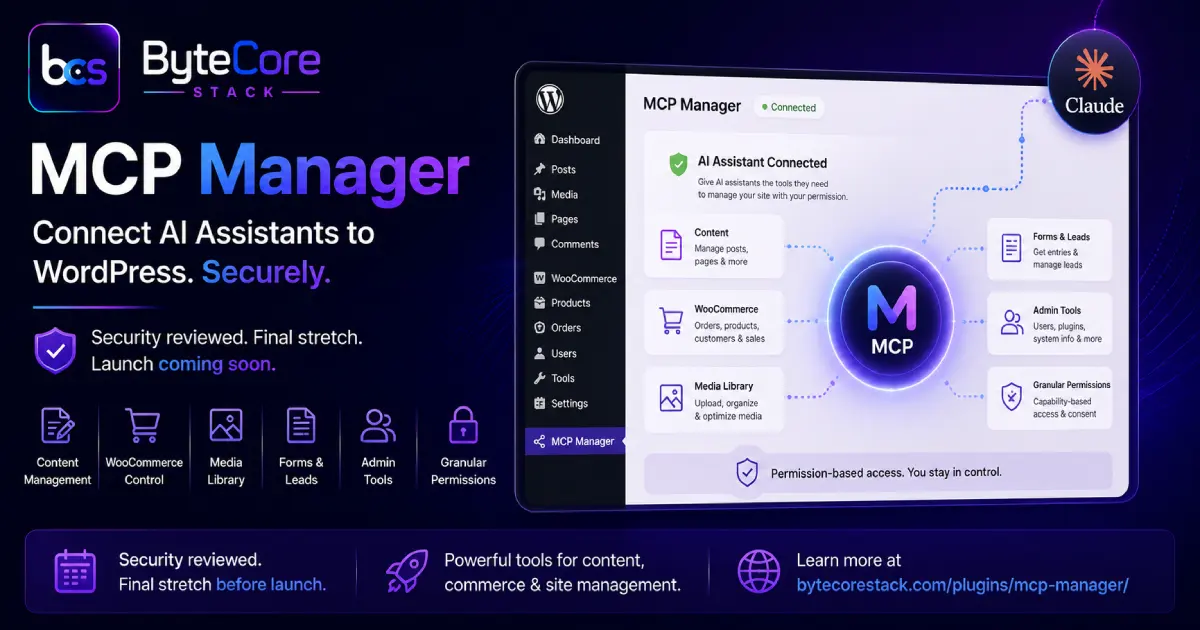
MCP Manager is a WordPress plugin that implements the Model Context Protocol (MCP), an open standard that lets AI assistants like Claude talk to external systems through a defined set of tools instead of screen-scraping or guesswork. Once installed, MCP Manager exposes your site’s content, WooCommerce store, forms, users, and media library as a set of callable tools that an AI assistant can use on your behalf, with your explicit permission at every step.
In practice, that means you can ask an AI assistant to draft a blog post, upload a featured image, tag it, and publish it as a draft, or pull your latest WooCommerce orders and summarize revenue, without opening the WordPress admin at all. We covered the original vision behind the plugin in MCP Manager: Connect Claude AI to WordPress, and gave an early look at the roadmap in MCP Manager for WordPress: What to Expect. This post is the update on where things actually stand.
Why the Launch Timeline Moved
MCP Manager was submitted to the WordPress.org plugin review team, and the review came back with three security findings that needed to be closed out before approval: a capability bypass on object-level permissions, a way to reach disabled endpoints under specific conditions, and a consent-denial bypass that could let a tool call proceed even after a user declined it. All three have been patched. The capability checks are now enforced at the object level rather than just the endpoint level, disabled tools are rejected before any processing happens, and a denied consent request now hard-stops the entire tool call chain rather than just skipping one step.
That review process is exactly why we’d rather ship a slightly later, more solid v1.0 than rush a plugin that hands an AI model write access to your site. Security fixes for something that touches WooCommerce orders, user data, and content publishing aren’t optional shortcuts.
Core Features at Launch
1. Full Content Management
Create, edit, publish, and organize posts and pages, including categories, tags, featured images, and custom post types. An AI assistant can research a topic, write a draft, format it, and set SEO fields, then hand it back to you for a final review before it goes live.
2. WooCommerce Store Control
Read and manage products, orders, coupons, customers, and inventory. This covers everyday store operations like checking stock levels, updating prices, issuing refunds, and pulling revenue summaries without logging into wp-admin.
3. Media Library Access
Upload images from a URL or base64 data, set featured images, update alt text and captions, and manage attachment metadata. This is what powers a fully automated publishing workflow from research to a finished, image-complete post.
4. Forms and Lead Data
Pull entries from Gravity Forms and similar form plugins so an AI assistant can summarize leads, flag urgent submissions, or draft follow-up responses.
5. Site Administration Tools
User management, plugin and theme inventory, server and database diagnostics, cache control, and cron job visibility. These are read-heavy by design, giving an AI assistant enough context to troubleshoot a site without needing broad write access.
6. Granular Consent and Capability Controls
Every tool call can be scoped by capability, and destructive actions (deleting content, refunding orders, changing user roles) require explicit consent that can’t be bypassed programmatically. This is the layer that got the most attention during the security review, and it’s the reason the plugin is safe to run on a live production site.
MCP Manager vs. Manual Admin Work
| Task | Without MCP Manager | With MCP Manager |
|---|---|---|
| Publish a researched blog post | Manual research, drafting, formatting, image upload, tagging | AI assistant handles research through draft in one workflow |
| Check store revenue | Log into wp-admin, open WooCommerce reports | Ask the AI assistant directly, get a summary instantly |
| Update product stock | Navigate to each product, edit manually | Batch updates via a single instruction |
| Review form leads | Open Gravity Forms entries one by one | AI assistant summarizes and prioritizes leads |
| Site diagnostics | Check multiple admin screens and logs | One query returns server, plugin, and database status |
Who Should Use MCP Manager
MCP Manager is built for WordPress site owners, agencies, and developers who already use an AI assistant for research or writing and want that assistant to act on the site directly, rather than just producing text they have to copy and paste. It’s also useful for anyone running WooCommerce who wants faster access to order and inventory data without digging through admin screens.
If you manage multiple client sites, the capability-scoped consent system means you can give an assistant enough access to be genuinely useful without handing over unrestricted admin rights.
What Happens Next
With the security fixes complete, the remaining steps before the WordPress.org listing goes live are final documentation, the plugin’s readme and screenshots, and a last round of testing across different hosting environments. Until it’s listed on WordPress.org, you can find full details on the MCP Manager plugin page, and early access requests are open now.
Frequently Asked Questions
Is MCP Manager available on WordPress.org yet?
Not yet. The plugin has passed its security review, and the remaining work is documentation and final testing before the WordPress.org listing goes live. You can follow progress and get early access details on the MCP Manager plugin page.
What AI assistants work with MCP Manager?
MCP Manager implements the Model Context Protocol, an open standard, so it works with any MCP-compatible AI assistant, including Claude. It isn’t locked to a single provider.
Is it safe to let an AI assistant manage my WordPress site?
MCP Manager enforces capability-scoped permissions and requires explicit consent for destructive actions like deletions, refunds, or role changes. Consent denial is a hard stop that can’t be bypassed, and this control layer is exactly what went through WordPress.org’s security review.
Does MCP Manager work with WooCommerce?
Yes. MCP Manager includes tools for products, orders, coupons, customers, and inventory, so an AI assistant can handle common store operations directly.
How do I get early access?
Reach out through the ByteCore Stack contact page or subscribe for launch updates, and you’ll be notified as soon as the WordPress.org listing and early access builds are available.
Conclusion
MCP Manager has moved from “coming soon” to “final stretch.” The security review is done, the core feature set is locked, and what’s left is the packaging work that turns a tested plugin into a public WordPress.org release. If you want an AI assistant that can actually act on your WordPress site, not just talk about it, this is the plugin to watch.
Get the details on the MCP Manager plugin page, subscribe for launch updates, or contact ByteCore Stack for early access and custom integration questions.
Explore More From ByteCore Stack
MCP Manager: https://bytecorestack.com/plugins/mcp-manager/
SMTP Manager: https://wordpress.org/plugins/bcs-smtp-manager/
Lightsail Manager: https://wordpress.org/plugins/bytepresstech-cdn-manager-for-lightsail/