
The Web Is Being Read by AI — Is Your Site Ready?
Search is changing. Tools like Claude, ChatGPT, Perplexity, and Google’s AI Overviews are no longer just pointing users to links — they’re reading your website, summarising it, and answering questions on your behalf. The problem? Most websites weren’t built for this.
Modern websites are packed with navigation menus, JavaScript, cookie banners, ads, and design code. When an AI model crawls your site, it has to dig through all of that noise just to find your actual content. It wastes the AI’s limited context window, increases the chance of misrepresentation, and can result in hallucinated or inaccurate information being attributed to your brand.
That’s exactly the problem llms.txt was designed to solve — and in 2026, it’s one of the smartest low-effort, high-reward moves any website owner can make.
What Is llms.txt?
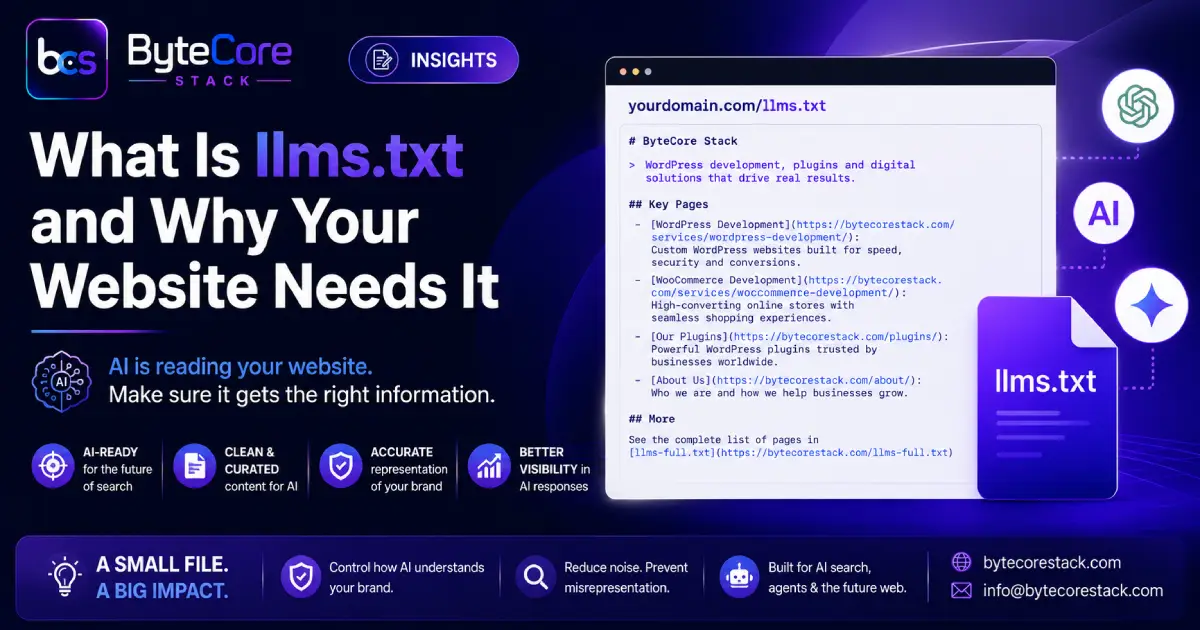
llms.txt is a plain text file written in Markdown format, placed at the root directory of your website (e.g., yourdomain.com/llms.txt). It gives large language models (LLMs) a clean, structured, and curated summary of your website — what you do, who you serve, and where your most important content lives.
Think of it as the AI-era equivalent of robots.txt or sitemap.xml — but instead of telling crawlers what they can access, it tells AI models what your site is about.
The standard was proposed in September 2024 by Jeremy Howard, co-founder of Answer.AI and fast.ai. The core insight was simple: AI models have limited context windows and struggle to parse the noise of modern web pages. A dedicated llms.txt file cuts through all of that clutter and gives the AI exactly what it needs.
By 2026, companies like Anthropic, Stripe, Vercel, Cloudflare, Hugging Face, and Coinbase have already implemented llms.txt. Yoast became the first major SEO plugin to support auto-generation of the file. Webflow introduced a built-in upload system. IDE agents like Cursor, Claude Code, Windsurf, and GitHub Copilot now actively look for /llms.txt and /llms-full.txt when interacting with documentation sites.
How Is llms.txt Different from robots.txt and sitemap.xml?
These three files serve different audiences and different purposes:
| File | Purpose | Audience |
|---|---|---|
| robots.txt | Controls crawler access — what bots can and cannot index | Search engine crawlers (Googlebot, Bingbot) |
| sitemap.xml | Lists all pages on your site for systematic indexing | Search engines |
| llms.txt | Provides a curated, AI-readable summary of your most important content | AI language models and agents |
Unlike sitemap.xml, which lists every URL on your site, llms.txt is intentionally curated — it points AI systems to only your most important and accurate pages. Unlike robots.txt, it doesn’t block access; it guides understanding.
Why Does This Matter in 2026?
AI-driven search and agent-based browsing are growing fast. When a user asks Claude or ChatGPT “what’s the best WordPress SMTP plugin?” or “who can build a custom WooCommerce store in India?”, the AI doesn’t run a Google search — it reads websites directly. If your site is messy or unclear, the AI either skips it or gets it wrong.
Here’s what’s at stake without llms.txt:
- AI tools may misrepresent your products, services, or pricing
- Outdated blog posts or irrelevant pages may overshadow your core offerings
- AI coding assistants like Cursor may hallucinate API endpoints or plugin features
- Agentic tools browsing on a user’s behalf may miss your key service pages entirely
With llms.txt in place, you take control of your AI-first brand narrative.
The Business-to-Agent (B2A) Opportunity
There’s a concept gaining traction in 2026 called Business-to-Agent (B2A) — the idea that AI agents, not just humans, are now a primary audience for your website. Just as brands once needed human-navigable websites, and then mobile-friendly apps, they now need machine-readable surfaces for AI agents to route on.
llms.txt is the first widely-adopted B2A standard. IDE agents fetch it routinely. Shopping agents browsing on behalf of users need clean access to pricing, policies, and product pages. Sales-research agents summarise vendor sites for procurement decisions. In every one of these cases, a well-structured llms.txt materially changes how your brand is represented.
What Does an llms.txt File Look Like?
The format is straightforward Markdown. Here’s the basic structure:
# Your Brand Name

> One-sentence description of what your site does and who it's for.

## Key Pages

- [Page Title](https://yourdomain.com/page/): Brief description of the page.
- [Another Page](https://yourdomain.com/another/): What this page covers.

## Optional

- [Less Critical Page](https://yourdomain.com/misc/): AI can skip this if context is limited.
The rules are simple: the file must be named exactly llms.txt (lowercase), placed at your site root, encoded in UTF-8, and structured in valid Markdown. Don’t stuff it with marketing fluff — AI models prefer factual, specific descriptions over hype.
llms.txt vs llms-full.txt — What’s the Difference?
llms.txt is the lightweight, curated index — a short Markdown file listing your most important pages with brief descriptions. It’s designed for real-time AI reads where context is limited.
llms-full.txt is the extended version — a more exhaustive reference that can include your full blog index, detailed plugin or product documentation, service descriptions, FAQs, and more. Think of it as the complete library vs the index card.
Both files can coexist. Your llms.txt should link to llms-full.txt so AI agents that want the complete picture can access it.
How to Create llms.txt for Your WordPress Site
There are two approaches depending on your setup:
Option 1: Manual Creation (Recommended for Full Control)
Create a plain text file named llms.txt, write it in Markdown format following the structure above, and upload it to your site’s root directory via cPanel File Manager or FTP. This gives you full control over what AI models see.
Option 2: Plugin-Based (Yoast or Similar)
Yoast SEO has introduced one-click llms.txt generation. If you’re using Yoast, check your settings for the auto-generation option. However, auto-generated files tend to be generic — manual customisation is recommended for accurate brand representation.
Option 3: Custom WordPress Implementation
For developers, you can serve llms.txt dynamically via a WordPress plugin or functions.php — generating it from your posts, pages, and plugin data on demand, keeping it automatically updated as your site grows.
At ByteCore Stack, we’ve implemented both /llms.txt and /llms-full.txt manually — with our full blog index, detailed plugin descriptions for MCP Manager, SMTP Manager, and Lightsail Manager, and our complete service offering. This ensures any AI assistant that reads our site gets accurate, up-to-date information about what we build and who we serve.
Common Mistakes to Avoid
- Wrong filename: It must be
llms.txt— notllm.txt, notLLMs.txt - Wrong location: Must be at the root (
/llms.txt), not in a subfolder - Marketing fluff: “Revolutionary world-class platform” tells AI nothing — be specific and factual
- Broken links: Every URL in the file should return a clean 200 status
- Set and forget: Update it when you add new products, services, or key content
- Including blocked pages: Don’t list URLs that are noindex or blocked in robots.txt
Does llms.txt Affect Google Rankings?
Not directly — Google has not confirmed llms.txt as a ranking factor for traditional search. However, this file is specifically designed for generative AI engines (Claude, ChatGPT, Perplexity) and agentic tools, not blue-link search results. The value lies in AI-first visibility, accurate brand representation, and future-proofing your site as the web shifts toward agent-based discovery.
Creating the file takes under 30 minutes and costs nothing. If it becomes the global standard — and adoption is accelerating — you’ll already be ahead. If not, you have a clean, text-only summary of your brand that AI can easily read. It’s pure upside.
FAQs About llms.txt
Is llms.txt an official web standard?
Not yet — it is a proposed standard originated by Jeremy Howard of Answer.AI in 2024. It has no official backing from IETF or W3C, but adoption is growing rapidly, with major tech companies including Anthropic, Stripe, Vercel, and Cloudflare already implementing it.
Do AI tools actually read llms.txt?
Yes — Claude Code, Cursor, Windsurf, GitHub Copilot, and Perplexity are known to actively fetch llms.txt and llms-full.txt. ChatGPT and Google’s AI systems have growing but inconsistent support. Server logs from technical sites confirm AI crawlers requesting the file.
Should my WordPress site have llms.txt?
Yes — especially if you sell products, plugins, or services. It costs nothing and takes under 30 minutes to create. It gives you direct control over how AI models represent your brand, preventing hallucinations and misrepresentation in AI-generated answers.
What’s the difference between llms.txt and sitemap.xml?
Your sitemap.xml lists every page on your site for search engine indexing. llms.txt is a curated, short-form guide for AI models — listing only your most important pages with clear descriptions. Sitemap = completeness. llms.txt = clarity and curation.
Can llms.txt prevent AI from hallucinating about my brand?
It significantly reduces the risk. By giving AI models a factual, structured, first-party source about your brand, products, and services, you reduce reliance on AI guessing from incomplete or outdated HTML pages. It is not a guarantee, but it is the most direct tool available for controlling your AI-first brand narrative.
How often should I update llms.txt?
Update it whenever you launch a new product, add a key service page, publish a major blog post, or change your positioning. Treat it the same way you would update your sitemap — as a living document that reflects your current site.
Conclusion
llms.txt is one of the simplest, highest-leverage things you can add to your website in 2026. As AI agents increasingly browse, summarise, and act on web content on behalf of users, having a clean, accurate, machine-readable representation of your site is no longer optional — it’s competitive infrastructure.
Whether you run a WordPress blog, a WooCommerce store, a plugin product, or a web development agency, llms.txt gives you direct control over how AI models see and represent your brand. It takes 30 minutes, costs nothing, and future-proofs your site against the AI-first web that’s already here.
At ByteCore Stack, we’ve already implemented /llms.txt and /llms-full.txt — covering our plugins, services, blog, and key pages. If you need help implementing this for your WordPress site, or want a custom dynamic llms.txt solution, get in touch with us.
Explore More from ByteCore Stack
If you found this guide useful, explore more of our content on AI, WordPress, and web development:
- MCP Manager: Connect Claude AI to WordPress — Use AI to manage your entire WordPress site via natural language
- WordPress 7.0 Armstrong: All New Features Explained — Everything new in the latest WordPress release
- AI ROI Pressure: What It Means for Your Website 2026 — How the AI investment wave is reshaping web priorities
- Fix WordPress Email Deliverability with SMTP Manager — Stop WordPress emails going to spam
Our WordPress Plugins
Supercharge your WordPress site with our developer-built plugins:
- 🔌 MCP Manager — Connect Claude AI or any MCP-compatible assistant to your WordPress site
- 📧 SMTP Manager — Fix WordPress email deliverability with reliable SMTP routing
- ⚡ Lightsail Manager — Manage AWS Lightsail CDN directly from your WordPress dashboard