
Why WordPress Sites on AWS Lightsail Need Smarter CDN Management
AWS Lightsail has become one of the most popular choices for developers hosting WordPress sites on the cloud. With predictable monthly pricing starting at just $3.50/month, pre-configured WordPress blueprints, and seamless access to the broader AWS ecosystem, it hits the sweet spot between simplicity and power.
But managing your Lightsail CDN distribution — purging caches, updating origins, checking distribution status — has always meant leaving WordPress and heading into the AWS console. That context-switching is a workflow killer, especially for developers juggling multiple sites or clients.
That’s exactly the problem Lightsail Manager by ByteCore Stack solves. And if you’re already exploring what our plugin suite can do, check out our post on MCP Manager for WordPress and our SMTP Manager guide for WordPress email deliverability.
What Is Lightsail Manager?
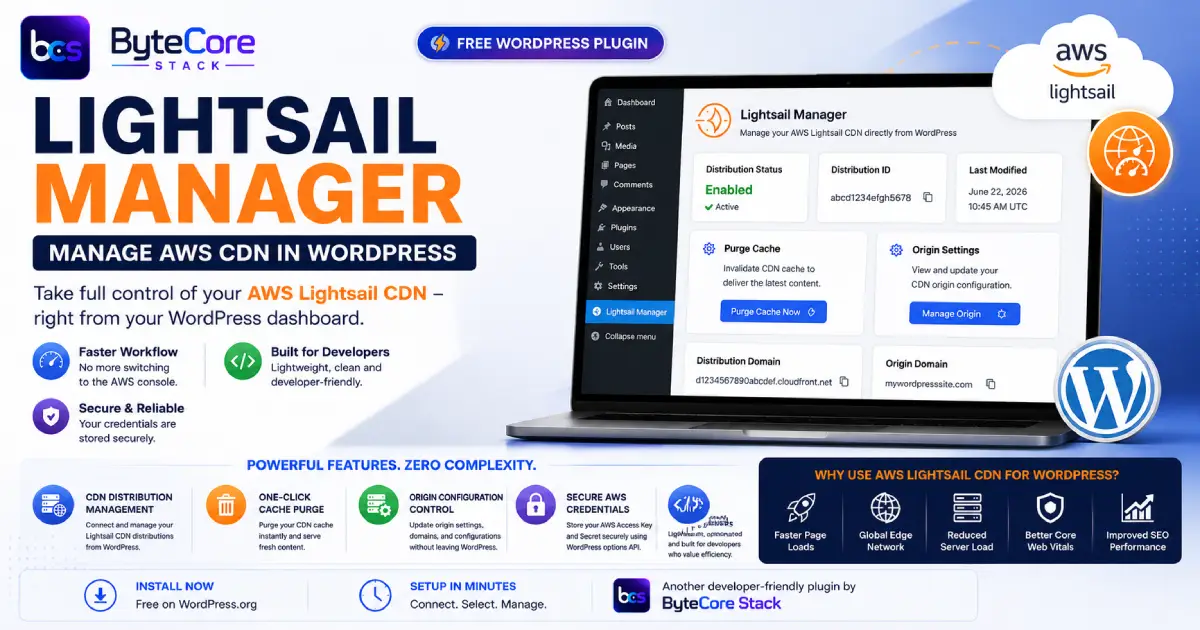
Lightsail Manager (bytepresstech-cdn-manager-for-lightsail) is a free WordPress plugin that integrates your AWS Lightsail CDN distribution directly into the WordPress admin dashboard. Instead of logging into the AWS console every time you need to manage your CDN, you can do it all from within WordPress — faster, cleaner, and without breaking your development flow.
It’s built for WordPress developers, agencies, and site owners who run their WordPress installations on AWS Lightsail and want a streamlined, no-fuss way to control their CDN without deep AWS expertise. If you’re comparing platforms for your project, our WordPress vs Shopify vs Magento comparison for 2026 is a great place to start.
Key Features of Lightsail Manager
1. CDN Distribution Management from WordPress
Connect your AWS Lightsail distribution to WordPress in minutes. View distribution details, check status, and manage your CDN settings — all from the familiar WordPress dashboard interface.
2. One-Click Cache Purge
Stale cache is one of the most common causes of content not showing up after updates. With Lightsail Manager, you can purge your Lightsail CDN cache with a single click directly from WordPress, no AWS console required.
3. Origin Configuration Control
Update your CDN distribution’s origin settings without leaving WordPress. Whether you’re pointing to a new server, updating your domain, or adjusting origin configurations, Lightsail Manager puts it all in one place.
4. Secure AWS Credential Storage
Your AWS Access Key and Secret are stored securely within WordPress using WordPress’s native options API. You connect once and manage everything from that point forward.
5. Designed for Developers
Lightsail Manager is lightweight, opinionated, and built for developers who value clean integrations. No bloat. No unnecessary settings. Just the CDN controls you actually need, exactly where you need them.
Who Should Use Lightsail Manager?
Lightsail Manager is ideal for:
- WordPress developers who host client sites on AWS Lightsail and need efficient CDN management
- Agencies managing multiple WordPress sites on Lightsail distributions
- Freelancers who want AWS power without AWS complexity in their daily workflow
- Small business owners running WordPress on Lightsail who want to maintain their own CDN without needing a developer for every cache purge
AWS Lightsail CDN: Why It Matters for WordPress Performance
AWS Lightsail’s CDN distributions are powered by Amazon CloudFront under the hood — one of the world’s fastest and most reliable content delivery networks. For WordPress sites, using a Lightsail CDN distribution means:
- Static assets (images, CSS, JS) are served from edge locations closest to your visitors
- Reduced load on your origin server, improving response times
- Better performance scores on Core Web Vitals — a direct SEO factor
- Protection against traffic spikes via distributed caching
A WordPress site on Lightsail with an active CDN distribution can see dramatically faster page loads — especially for international audiences. But only if the CDN is managed correctly. Outdated caches, wrong origin settings, or misconfigured distributions silently hurt your site’s performance. Lightsail Manager gives you direct control without the friction. For more on how the WordPress ecosystem is evolving, see our breakdown of WordPress 7.0 Armstrong and its new features.
How to Get Started with Lightsail Manager
Getting up and running takes just a few minutes:
- Install the plugin from WordPress.org or upload it directly to your WordPress site
- Enter your AWS credentials (Access Key ID and Secret Access Key) in the plugin settings
- Select your Lightsail distribution from the dropdown — the plugin will detect your available distributions automatically
- Start managing — purge cache, check status, update origin settings, all from your WordPress dashboard
No complicated setup. No cloud architecture knowledge required. If you can configure a WordPress plugin, you can manage your AWS Lightsail CDN with Lightsail Manager.
Lightsail Manager vs. Manually Managing the AWS Console
| Task | AWS Console | Lightsail Manager |
|---|---|---|
| Purge CDN cache | Login → Navigate → Invalidate | One click in WordPress |
| Check distribution status | Open Lightsail → Networking tab | Visible in WP dashboard |
| Update origin settings | Multiple console screens | Single settings page |
| Context switching | Yes — leave WordPress | No — stay in WordPress |
| AWS expertise required | Moderate | Minimal |
Frequently Asked Questions
Do I need an AWS account to use Lightsail Manager?
Yes. Lightsail Manager connects to your existing AWS Lightsail account. You’ll need an AWS account with at least one Lightsail CDN distribution set up, plus an IAM user with Lightsail permissions to generate API credentials.
Is Lightsail Manager free?
Yes, Lightsail Manager is completely free. You can download and install it directly from the WordPress.org plugin repository at no cost.
Does my WordPress site need to be hosted on Lightsail to use this plugin?
Your WordPress site doesn’t necessarily have to be hosted on a Lightsail instance, but you do need an active AWS Lightsail CDN distribution configured to use the plugin’s core features.
Are my AWS credentials stored securely?
Your AWS credentials are stored using WordPress’s native options storage. We recommend using an IAM user with minimal required permissions (Lightsail read/write only) rather than root account credentials, following AWS security best practices.
Will Lightsail Manager work with other CDN plugins?
Lightsail Manager is specifically built for AWS Lightsail CDN distributions. It doesn’t conflict with other CDN plugins, but its features are purpose-built for Lightsail and won’t manage distributions on other CDN providers.
What WordPress version is required?
Lightsail Manager requires WordPress 5.0 or higher and PHP 7.4+. It’s tested with the latest version of WordPress and fully compatible with WordPress multisite.
Conclusion: Manage Your Lightsail CDN Without Leaving WordPress
If you’re running WordPress on AWS Lightsail, you’re already making a smart infrastructure choice — reliable, scalable, and backed by AWS. But CDN management shouldn’t pull you out of your WordPress workflow every time you need to purge a cache or check a distribution status.
Lightsail Manager by ByteCore Stack closes that gap. Install it once, connect your AWS credentials, and manage your Lightsail CDN distribution without ever opening the AWS console again.
It’s free, it’s lightweight, and it does exactly what it says. That’s the ByteCore Stack way. Want to see how we approach all our plugins? Read our deep dive on managing your AWS Lightsail CDN from WordPress and our overview of MCP Manager bridging WordPress and AI assistants like Claude.
Get Lightsail Manager — Free on WordPress.org
Ready to streamline your AWS Lightsail CDN management? Install Lightsail Manager today and take control of your WordPress CDN from the dashboard you already work in every day.
→ Download Lightsail Manager on WordPress.org
Explore More ByteCore Stack Plugins
- MCP Manager — Connect Claude AI to your WordPress site via the Model Context Protocol
- SMTP Manager — Reliable WordPress email delivery with full SMTP configuration and logging
- Lightsail Manager — AWS Lightsail CDN management directly inside WordPress